
Instant file search —
for you and for your agents
YasnaSearch reads the NTFS Master File Table directly (the Everything trick) and indexes millions of files in seconds. Then it hands that index to Claude, Cursor, ChatGPT, Gemini, VS Code and any other MCP client — so finding one file takes about 200 milliseconds.
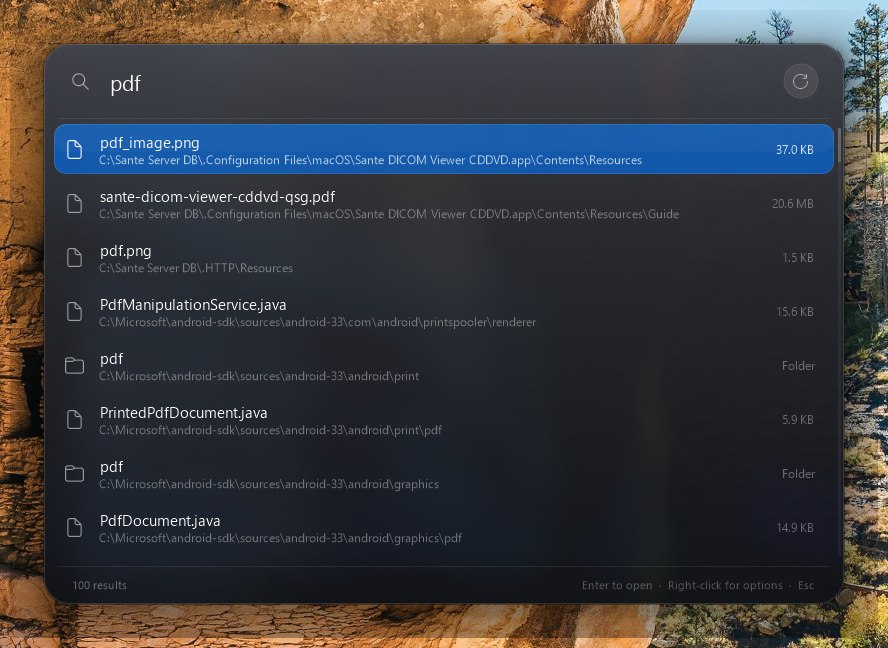
search call and gets the exact path back.
Why are agents slow without it?
A language model cannot see a filesystem. Finding one file usually means guessing, and every guess is a tool round trip.
Folder-by-folder hunting
Every ls/dir is a blind step; on a drive with millions of files it takes dozens of calls.
Token cost
Directory listings go back into the context — hundreds of kilobytes of noise and a visibly slower agent.
YasnaSearch
One search call → full path, size and modified time. No hunting, no guessing, ~200 ms.
Features
Everything you expect from a Windows search tool — plus a brain for agents.
MFT index, not a disk walk
Reads $MFT and the USN journal; 14 million files in about half a minute.
A ready MCP server
Five standard Model Context Protocol tools over stdio. No server to run, no cloud.
Persian, Arabic, Hebrew
Complex scripts are shaped and right-to-left names rendered correctly.
Glass panel + Alt+Space
A Spotlight-style translucent launcher, a tray icon and an MCP settings page.
Local and private
Nothing leaves the machine. The service listens on 127.0.0.1:8123 only.
Windows service + CLI
The index is built once in the service; the GUI, MCP and the CLI share it.
Install in three steps
Windows 10 or 11, 64-bit. The service installs with Administrator rights because raw MFT access needs them.
- Download the single executable — no dependencies.
- Run it and accept the UAC prompt so the YasnaSearch service installs and starts.
- Use it — Alt+Space to search, and tray → MCP settings to connect your agents.
yasnasearch.exe              launch the search panel
yasnasearch.exe install      install the service (UAC)
yasnasearch.exe mcp          MCP server over stdio
Useful paths
Program: C:\Program Files\YasnaSearch\yasnasearch.exe
MCP settings and log: %LOCALAPPDATA%\YasnaSearch\
Service index: %ProgramData%\YasnaSearch\index.bin
Local API: http://127.0.0.1:8123/ (/search, /status, /reindex)
The MCP log rotates at 192 KB and keeps three older generations, so it never grows without bound.
Give your tools the MCP server
One standard stdio server. Any MCP-capable client connects with a few lines of configuration.
The five tools the model gets
| Tool | What it does |
|---|---|
search | Case-insensitive substring search over file names (or full paths with path: true); arguments: query, limit, path, drive |
get_file_info | One exact path: type, size, modified time — straight from the file system |
list_drives | NTFS volumes available for indexing |
reindex | Rebuild the index through the service (once, for every client) |
recent_changes | Latest USN journal events: created / deleted / renamed |
Claude Desktop
Open %APPDATA%\Claude\claude_desktop_config.json and add this (if you already have servers, add just the yasnasearch key inside mcpServers):
{
  "mcpServers": {
    "yasnasearch": {
      "command": "C:\\Program Files\\YasnaSearch\\yasnasearch.exe",
      "args": ["mcp"]
    }
  }
}
Quit Claude Desktop completely and reopen it; the tools indicator should list YasnaSearch. Then just ask: “find files whose name contains report”.
Claude Code (CLI)
One command, no file editing:
claude mcp add yasnasearch -- "C:\Program Files\YasnaSearch\yasnasearch.exe" mcpCheck it with claude mcp list. Run the same command inside a project to scope it there.
Cursor
Create .cursor/mcp.json in the project (or %USERPROFILE%\.cursor\mcp.json for all projects):
{
  "mcpServers": {
    "yasnasearch": {
      "command": "C:\\Program Files\\YasnaSearch\\yasnasearch.exe",
      "args": ["mcp"]
    }
  }
}
Cursor → Settings → MCP should show the server with a green status.
VS Code / GitHub Copilot (Agent mode)
Create .vscode/mcp.json in the workspace root:
{
  "servers": {
    "yasnasearch": {
      "type": "stdio",
      "command": "C:\\Program Files\\YasnaSearch\\yasnasearch.exe",
      "args": ["mcp"]
    }
  }
}
Switch the chat to Agent mode and YasnaSearch appears in the tool list.
ChatGPT, Gemini, Open WebUI and any HTTP client
These clients want MCP over HTTP, not stdio. Put a one-line bridge in front of it:
npx -y supergateway --stdio "C:\Program Files\YasnaSearch\yasnasearch.exe mcp" --port 8811Then register http://127.0.0.1:8811/sse as an MCP server:
- ChatGPT (developer mode / connectors): add an MCP connector with that URL.
- Gemini CLI / AI Studio: add an HTTP MCP server with that URL.
- Open WebUI: Settings → Tools → MCP →
http://127.0.0.1:8811/sse.
Note: the bridge listens on localhost only. If the client runs on another machine, publish it behind TLS and a token.
Codex CLI
In %USERPROFILE%\.codex\config.toml:
[mcp_servers.yasnasearch]
command = "C:\\Program Files\\YasnaSearch\\yasnasearch.exe"
args = ["mcp"]
Your own agent (Python + MCP SDK)
import asyncio
from mcp import ClientSession, StdioServerParameters
from mcp.client.stdio import stdio_client

params = StdioServerParameters(
    command=r"C:\Program Files\YasnaSearch\yasnasearch.exe",
    args=["mcp"],
)

async def main():
    async with stdio_client(params) as (read, write):
        async with ClientSession(read, write) as session:
            await session.initialize()
            tools = await session.list_tools()
            print([t.name for t in tools.tools])          # search, get_file_info, ...
            res = await session.call_tool("search", {"query": "report", "limit": 5})
            print(res.content[0].text)

asyncio.run(main())
Prefer raw JSON-RPC? Same server, Content-Length framing:
{"jsonrpc":"2.0","id":1,"method":"tools/call",
 "params":{"name":"search","arguments":{"query":"report","limit":10}}}
Other clients use the same mcpServers shape: Windsurf (mcp_config.json), Cline / Roo Code, Continue (~/.continue/config.json), Zed (context_servers) — and anything else that speaks “MCP server”.
Make sure it works
From inside the app — no extra tooling.
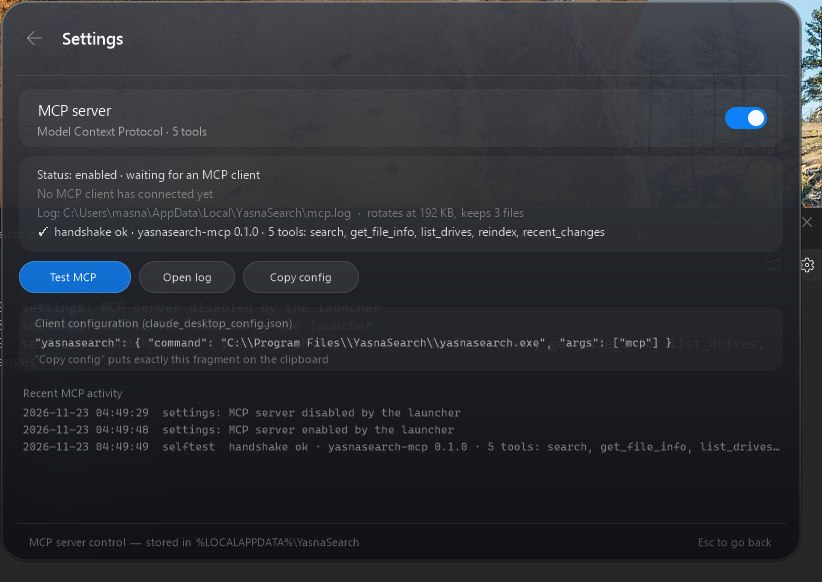
- Right-click the YasnaSearch tray icon → MCP settings…
- Press Test MCP: a real server is spawned as a client would and you should see
✓ handshake ok · yasnasearch-mcp 0.1.0 · 5 tools - Open log shows every tool call with its duration.
- Switch the server off whenever you like; new clients are refused and the reason is logged.
%LOCALAPPDATA%\YasnaSearch\mcp.log        MCP log (rotates: 192 KB x 3)
%LOCALAPPDATA%\YasnaSearch\settings.json  the MCP switch
Privacy and security
No cloud
Searching happens on this machine; no request leaves it.
Loopback only
The service and its API listen on 127.0.0.1, not on the network.
Can be switched off
The MCP switch in settings; off means no client can connect.
Download
One file. No installer, no dependencies.
yasnasearch.exe · v0.5.5
Windows 10/11 (64-bit) · 988 KB · free
SHA-256: cc9c7dc39e45576af2091057baa1f2229b1f598b1a13bb0e3b5684fa0be2e794 · checksum file
Auto-update: on every start the app reads version.txt and, when a newer build exists, downloads it, swaps itself in and restarts.
After install it puts an icon on the desktop and sits in the tray; Alt+Space opens it anywhere.
Search like Everything: a space is AND, *.log globs, regex:…, ext:jpg,png, size:>10mb, folder:, and -word to exclude.